Keep your team confident in the system they use every day.
A structured support relationship for incidents, user assistance, preventive reviews and ongoing improvement of your Odoo environment.
Existing Odoo users who need consistent ownership and predictable support capacity.
See how Odoo Helpdesk organizes support
An official product tutorial on helpdesk teams and stages, with screenshots of tickets, service levels and reporting. Arselor’s AMC scope is agreed separately.
Odoo support tickets, service targets and case review.
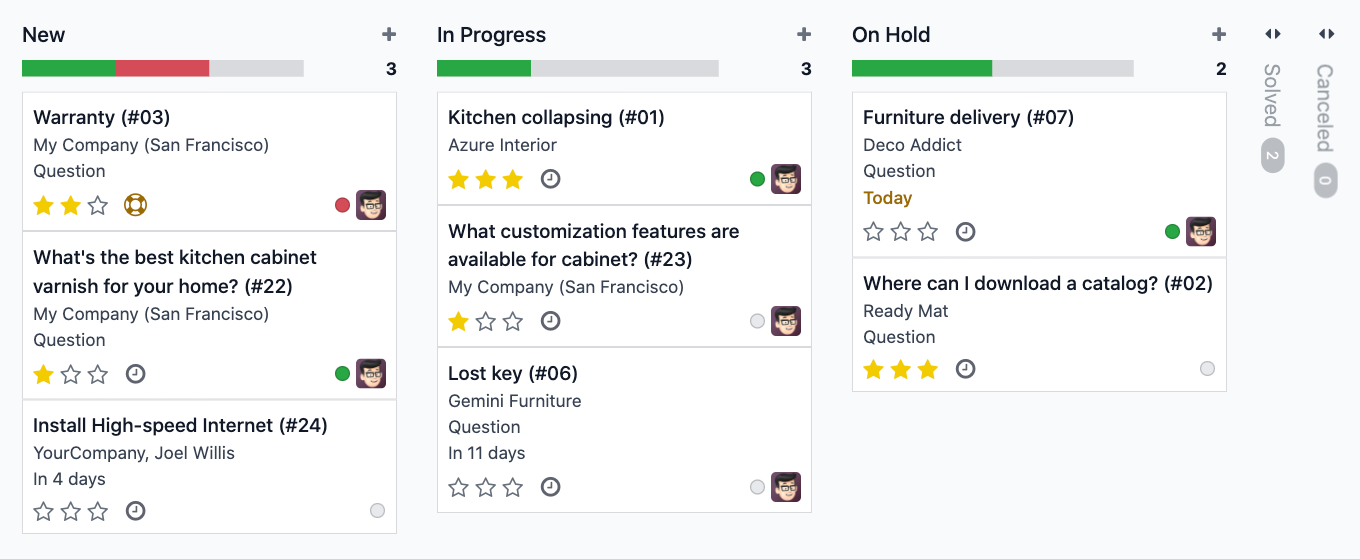
A visible support queue for Odoo
Give incidents and improvement requests a clear path from intake to resolution. When Odoo Helpdesk is selected, Arselor can configure ticket stages, priorities and assignment so the team can follow progress and keep a record of the outcome.
- Incident and request tracking
- Agreed escalation and coverage
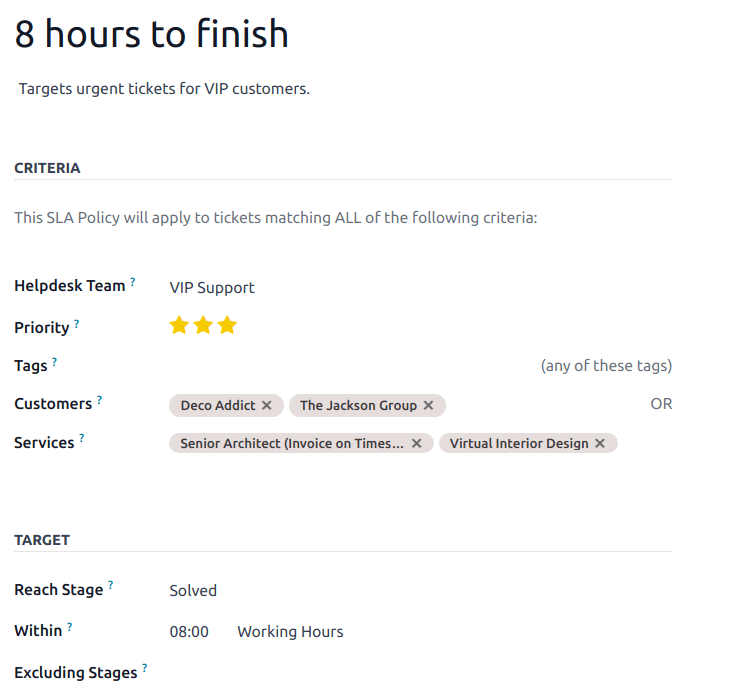
Give every support request a clear priority
Odoo Helpdesk can organize requests by team, priority and target stage. The policy shown is an Odoo documentation example, including its sample time target. Your Arselor AMC response targets, coverage hours and escalation arrangements are defined in the agreed support contract.
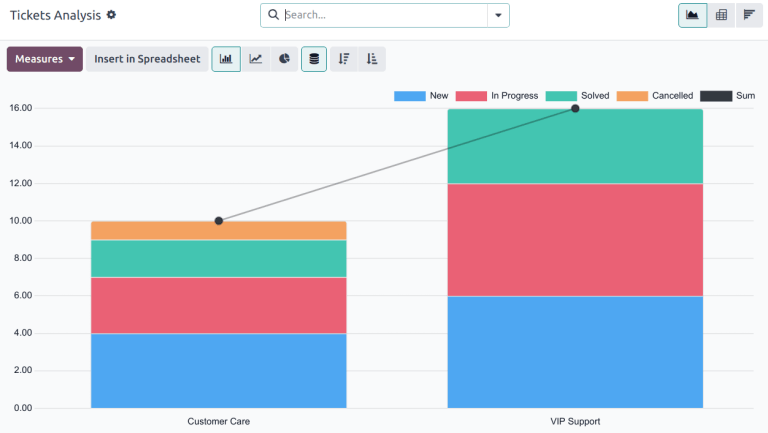
See what keeps coming back
Ticket analysis makes the support backlog and workflow stages visible. Arselor uses support reviews to separate one-off incidents from recurring configuration or training issues and agree the next improvement actions. The chart illustrates Odoo’s reporting interface with demonstration data.
Understand what it can do for you.
Keep daily work moving
Provide a clear support route for functional questions and system issues within your contract. Record the impact and process involved so requests reach the right specialist.
Improve with a clear scope
Separate incidents from enhancements and plan approved changes. Reporting, workflow adjustments and training needs can be prioritized against your support allowance.
Make ownership visible
Agree service hours, covered environments and escalation responsibilities. The package comparison below helps you start with a defined support model.
Choose a situation. Explore the possibilities.
After an Odoo go-live
Give users a consistent place to raise questions and resolve issues while the team settles in.
Discuss this use case- 01Log request
- 02Agree priority
- 03Resolve or plan
- 04Review
Taking over an existing system
Review access, customizations and outstanding issues before confirming support coverage.
Discuss this use case- 01Log request
- 02Agree priority
- 03Resolve or plan
- 04Review
A backlog of improvements
Prioritize requests with the business owner and distinguish support tasks from new project work.
Discuss this use case- 01Log request
- 02Agree priority
- 03Resolve or plan
- 04Review
From the first requirement to the final handover.
Environment and support onboarding
Functional and technical assistance
Incident ownership and escalation
Preventive system reviews
Support activity reporting
Improvement recommendations
Support the transactions your team relies on.
Take over the support context
Review the Odoo version, modules, integrations, access and known issues against the chosen AMC scope.
Investigate the business record
Reproduce the reported problem, inspect the relevant records and agree corrective action or a separately scoped change.
Review support and improvements
Confirm resolution with the requester and review recurring issues, preventive checks and the improvement backlog.
Choose your Odoo support plan.
Select up to two plans to compare their coverage.
Bronze
For teams that need occasional Odoo assistance.
Excluding VAT
Explore plan coverage +
- 3 low/medium requests per month · 36 per year
- 1 high-priority + 1 critical request per year
- 3 account creation or change requests
- Monthly monitoring and reporting
- Quarterly basic system check and cleanup
- Remote diagnosis and user guidance
Support during Arselor business hours.
Silver
For active teams with recurring support needs.
Excluding VAT
Explore plan coverage +
- 10 low/medium requests per month · 120 per year
- 3 high-priority + 1 critical request per year
- 3 account creation or change requests
- Monthly detailed system health report
- Quarterly diagnostics and database optimization
- Security-patch verification and remote guidance
Support during Arselor business hours.
Gold
For businesses needing closer oversight and escalation cover.
Excluding VAT
Explore plan coverage +
- Unlimited low/medium requests
- Up to 6 high-priority + 3 critical requests per year
- Up to 10 account changes
- Monitoring every two weeks
- Maintenance every two months
- Remote and agreed onsite support within 80 km
24/7 coverage for high and critical incidents.
Platinum
For organizations that need the broadest Odoo support coverage.
Excluding VAT
Explore plan coverage +
- Unlimited low, medium and high-priority requests
- Up to 6 critical requests per year
- Unlimited account administration
- Weekly system monitoring
- Monthly preventive maintenance
- 2 onsite visits per year within 80 km
24/7 coverage for high and critical incidents.
Annual commitment. Coverage and service targets follow your contract. Business hours: Sunday–Thursday, 8:30 AM–4:30 PM KSA.
Before you decide
Does AMC include new modules or major development?
Support coverage follows the contract. New implementations and substantial custom development are reviewed and quoted separately where required.
Can you support an Odoo system built by someone else?
We first review the environment, access, customizations and known issues before confirming support onboarding and coverage.
Build the rest of the picture.


Odoo ERP & integrations
Connect finance, sales, inventory, procurement, manufacturing and people with an Odoo environment built around your operations.
Make every part of your business work together.
- Connect the full operation
- Make the system fit your team
- Launch with confidence
Connect a quotation to stock availability, delivery and customer invoicing without re-entering the same information.

Software, chatbots & automation
Custom software, Odoo–WhatsApp integration and customer-care workflows that connect enquiries, teams and business records.
Turn everyday conversations into connected workflows.
- Start with the manual task
- Connect the systems you use
- Make the workflow maintainable
Route requests to the appropriate approver and keep a record of decisions and follow-up.

IT consultancy & training
Technology planning, infrastructure reviews, digital governance and practical training aligned with your business priorities.
Make technology decisions with a clear business purpose.
- Understand the business requirement
- Compare realistic options
- Build a sequenced roadmap
Clarify requirements and compare alternatives before committing to a platform or supplier.
Bring us the challenge. Let’s plan the way forward.
A focused conversation with the right Arselor specialist.