Turn everyday conversations into connected workflows.
Custom software, Odoo–WhatsApp integration and customer-care workflows that connect enquiries, teams and business records.
Sales and service teams managing recurring questions, lead follow-up and disconnected customer conversations.
Turn repeatable work into automation
An Odoo Studio tutorial showing automation rules—one example of the workflows Arselor can help assess and implement.
Triggers, actions and controlled integration workflows.
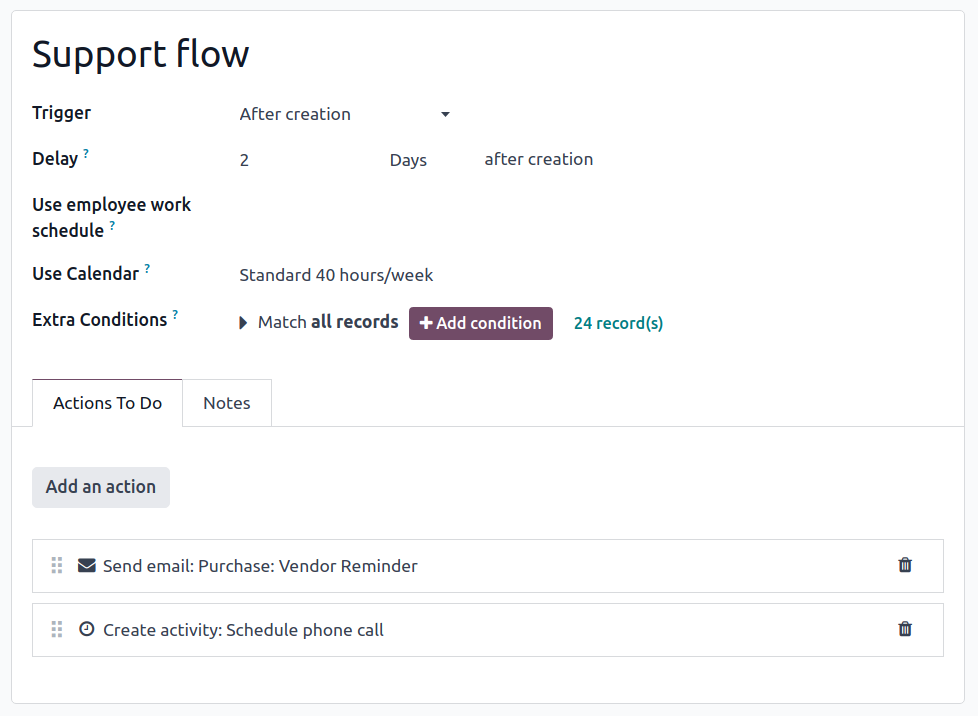
Make routine work move itself
Odoo Studio can trigger actions when records meet defined conditions. Arselor maps the business rule first, then configures notifications, approvals or follow-up actions and tests exceptions before the workflow is released.
- Rules based on your process
- Approvals and follow-up actions
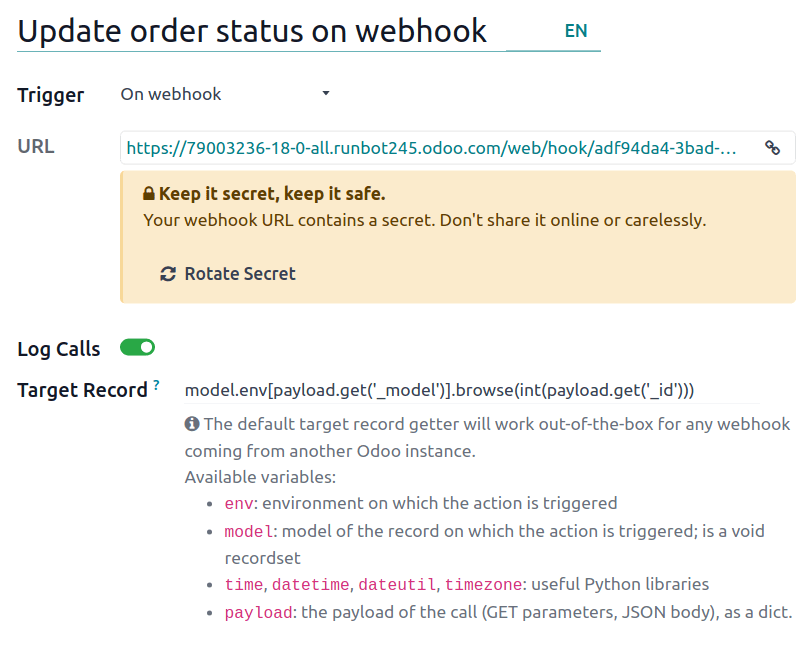
Connect an event to the next action
A webhook can pass an event from another system into an Odoo automation rule. This official example shows the trigger and target-record configuration. Arselor defines the field mapping, access controls, error handling and test cases so an integration does more than simply move data.
- Business event
A form, approval or system update
- Valid request
Run the agreed action and record the result
- Exception
Stop unsafe repeats and alert the owner
- Audit trail
Keep the request and outcome traceable
Build an exception path into every automation
Automation needs more than a successful demonstration. Arselor defines required fields, duplicate handling, permissions and exception ownership so a failed integration becomes a visible action for the responsible team.
Understand what it can do for you.
Start with the manual task
Identify the repeated data entry, approval or follow-up that slows your team down. We map triggers, decisions and exceptions before choosing how to automate.
Connect the systems you use
Design integrations around supported APIs and agreed data ownership. Records, validation and failure handling are considered alongside the successful path.
Make the workflow maintainable
Document the logic, access and operational handover. Test common and exceptional cases so your team knows what happens when an input needs human attention.
Choose a situation. Explore the possibilities.
Approval workflows
Route requests to the appropriate approver and keep a record of decisions and follow-up.
Discuss this use case- 01Trigger
- 02Validation
- 03Action
- 04Human review
System-to-system updates
Reduce duplicate entry by moving agreed records between business applications.
Discuss this use case- 01Trigger
- 02Validation
- 03Action
- 04Human review
Customer follow-up
Connect new enquiries with the right owner, next action and customer communication.
Discuss this use case- 01Trigger
- 02Validation
- 03Action
- 04Human review
From the first requirement to the final handover.
Business-process and customer-journey review
Application and integration development
Chatbot setup and conversation flows
Odoo CRM and WhatsApp integration
Workflow notifications and team handover
Testing, training and support planning
Turn one manual process into a maintainable automation.
Define the trigger and rules
Choose the business event, required data, approvals and conditions that should start or stop the workflow.
Build the connected action
Implement the agreed API or workflow action, including permissions, duplicate handling and exception reporting.
Test failures as well as success
Validate real examples and exceptions with users, then document ownership and safe change procedures.
Before you decide
Must all connected systems be Odoo?
No. We assess each system’s interfaces, permissions and data model before confirming the integration approach.
What happens when an integration fails?
The agreed design defines error handling, notifications, retry behavior and which team owns the exception.
Build the rest of the picture.


Odoo ERP & integrations
Connect finance, sales, inventory, procurement, manufacturing and people with an Odoo environment built around your operations.
Make every part of your business work together.
- Connect the full operation
- Make the system fit your team
- Launch with confidence
Connect a quotation to stock availability, delivery and customer invoicing without re-entering the same information.

IT consultancy & training
Technology planning, infrastructure reviews, digital governance and practical training aligned with your business priorities.
Make technology decisions with a clear business purpose.
- Understand the business requirement
- Compare realistic options
- Build a sequenced roadmap
Clarify requirements and compare alternatives before committing to a platform or supplier.

Odoo migration & upgrades
Assess an older Odoo environment, prepare data and customizations, test the upgraded database and guide the move into production.
Move your ERP forward with a clear transition plan.
- Know what is moving
- Test business processes first
- Make the cutover deliberate
Review the upgrade route and custom-module compatibility before moving the production database.
Bring us the challenge. Let’s plan the way forward.
A focused conversation with the right Arselor specialist.