Choose the software your team actually needs.
Sourcing, license planning and renewal coordination across productivity, design, security and business applications.
Teams standardizing subscriptions, equipping new staff or consolidating renewal management.

See software administration in practice
Watch Microsoft introduce the Microsoft 365 administrator role, then explore licensing and administration screens.

License allocation, edition choices and renewal records.
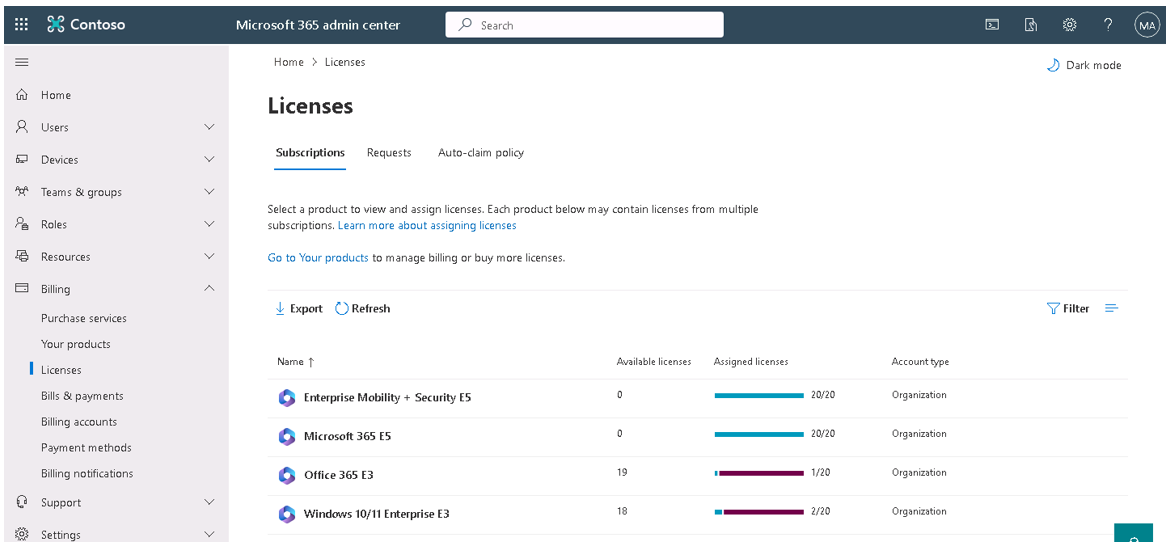
Make assigned and available licenses visible
The Microsoft 365 admin center groups subscription products with available and assigned license counts. Arselor helps reconcile the licenses you own with the people who need them, then plan changes and renewals. This Microsoft training screenshot uses a Contoso demonstration tenant; the products shown do not define your subscription entitlements.
- Users & devices
Who or what needs a license?
- Required capabilities
Email, desktop apps or specialist tools
- Edition & term
Confirm rights and subscription conditions
- Account ownership
Keep administration with the business
Choose licenses by the work people do
A mailbox user, a document-heavy role and a specialist application user do not necessarily need the same license. Arselor maps requirements to editions, eligible usage and the subscriptions needed for each group.
- Inventory
Products, quantities and end dates
- Review
Active use and changed requirements
- Confirm
Edition, term and approved order
- Verify
Activation and updated ownership records
Keep renewals connected to actual use
Renewal is a chance to review active users, unused assignments and changing requirements. We maintain the agreed subscription records and coordinate the selected renewal or change with clear administrative ownership.
Understand what it can do for you.
Match licenses to actual use
Review the people, devices and capabilities that need coverage. Compare suitable editions so teams have the software they need without unclear ownership.
Coordinate procurement and activation
Confirm the requested product, term and entitlement before ordering. Arselor can help organize activation and the administrative handover for the agreed scope.
Keep renewals visible
Maintain a practical view of subscriptions, renewal dates and responsible contacts. Review changes in team size or requirements before renewal decisions.
Choose a situation. Explore the possibilities.
New employees
Identify the productivity, security or specialist applications each role requires.
Discuss this use case- 01Requirements
- 02Edition & term
- 03Activation
- 04Renewal review
A renewal review
Check active use, required features and ownership before renewing subscriptions.
Discuss this use case- 01Requirements
- 02Edition & term
- 03Activation
- 04Renewal review
Specialist software
Scope design, engineering and business-software requirements with the relevant team.
Discuss this use case- 01Requirements
- 02Edition & term
- 03Activation
- 04Renewal review
From the first requirement to the final handover.
User and application needs review
License and edition comparison
Commercial sourcing and quotation
Subscription and activation coordination
Renewal and ownership records
Deployment and support options
Procure the right entitlement for each role.
Review the required use
Identify users, devices and capabilities, then compare eligible editions and subscription terms.
Quote and coordinate activation
Confirm product names, quantities and account ownership before procurement and license assignment.
Maintain the renewal record
Record the term and administration details, then review usage and changed requirements before renewal.
Before you decide
Can different employees use different plans?
Where the supplier permits it, we match plans to user needs and confirm any limits or dependencies before ordering.
Can we reduce the number of licenses at any time?
Seat reductions and cancellations depend on the supplier’s subscription terms and commitment period. We review these before changes.
Build the rest of the picture.


IT support & annual maintenance
Ad-hoc assistance and annual maintenance for users, devices, applications, networks, servers and cloud systems.
Less disruption. More productive working days.
- One route for everyday IT issues
- Prevent recurring disruption
- Choose support that fits
Create a dependable contact point for staff and a maintenance plan for the systems they rely on.


Zoapi meeting rooms
Wireless presentation, hybrid meeting integration, room booking and centralized management for professional collaboration spaces.
Start the meeting. Not another cable search.
- Wireless presentation & conferencing
- Room scheduling & touch control
- Useful screens. Manageable rooms.
Help small teams share content without repeatedly changing cables or adapting the room for each presenter.


Tanaza cloud Wi-Fi management
Centralize access-point configuration, guest access, firmware and monitoring across offices and branches.
Every branch. One clear view of your Wi-Fi.
- Manage Wi-Fi across locations
- Separate guest and business access
- See what needs attention
Offer a considered guest connection while keeping business devices on the appropriate network.
Bring us the challenge. Let’s plan the way forward.
A focused conversation with the right Arselor specialist.