Turn a customer conversation into a clear next step.
Connect enquiries, automated answers and human handover with the right customer record and follow-up process in Odoo.
Sales and service teams managing repeated questions, new enquiries and follow-up across WhatsApp and the website.
 WhatsApp
Explore WhatsApp inside your business workflow
Odoo’s WhatsApp basics tutorial demonstrates messaging and approved templates. Bot logic and integrations depend on the agreed solution.

WhatsApp conversations, templates and team handover.
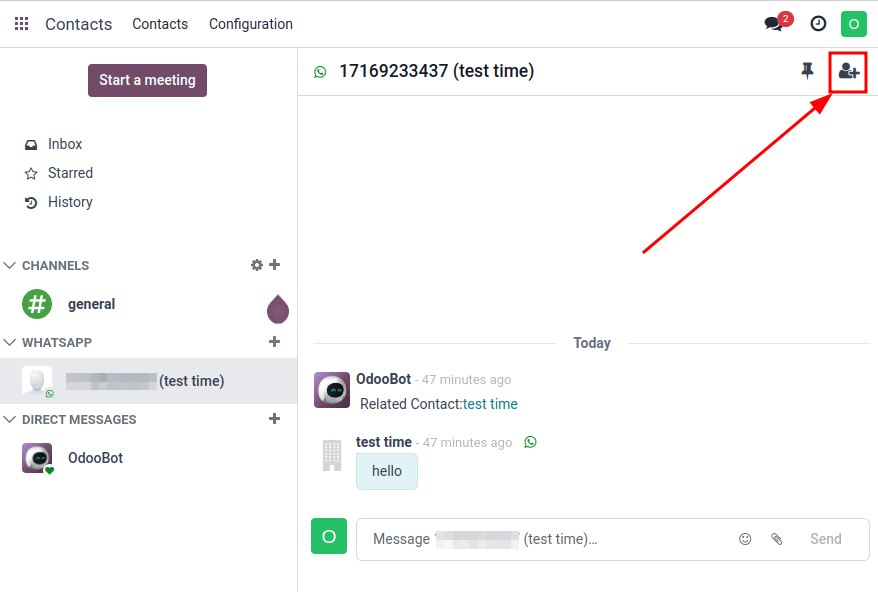
WhatsApp conversations in Odoo
Bring business conversations into a workspace connected to customer records. Arselor scopes the channel, approved message templates, routing and handover to your team.
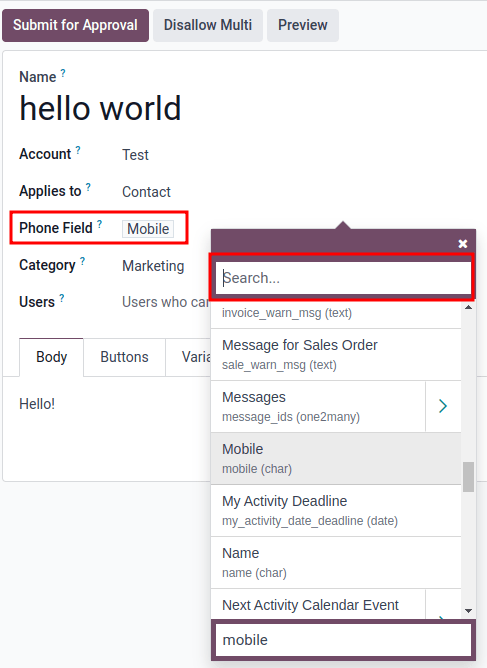
Prepare the right message for the right customer
Configure the message template, recipient phone field and business record before submitting the template for approval. The Odoo example shows where that connection is defined. Arselor helps map approved messages to useful events such as an enquiry follow-up or order update, with a clear route to a human agent.
- WhatsApp conversation
Identify the customer request
- Sales enquiry
Collect interest and route to the CRM owner
- Support request
Collect issue details and route to the team
- Human handover
Pass the context and continue the discussion
Give every conversation a useful next step
A sales question should reach sales; a support issue should reach the support team with its context. We define the questions, routing and Odoo fields so the bot collects useful information and a person can continue the conversation.
Understand what it can do for you.
Give customers a clear first response
Design conversational menus and answers around common enquiries. Customers can choose a service, share key details and reach a human when the conversation needs it.
Connect the conversation to Odoo
Scope how enquiries create or update the appropriate business record. Lead routing, support intake and follow-up should match your team’s actual workflow.
Launch a manageable channel
Agree content, handover rules, access and testing. WhatsApp Business Platform setup, message templates and usage costs are confirmed for the selected implementation.
Choose a situation. Explore the possibilities.
Sales enquiries
Ask the right first questions and route the opportunity to the responsible salesperson.
Discuss this use case- 01Customer chat
- 02Guided questions
- 03Odoo record
- 04Team handover
Support intake
Collect the service, issue and contact details before handing the request to the support team.
Discuss this use case- 01Customer chat
- 02Guided questions
- 03Odoo record
- 04Team handover
Customer follow-up
Connect an agreed business event with the appropriate approved customer communication.
Discuss this use case- 01Customer chat
- 02Guided questions
- 03Odoo record
- 04Team handover
From the first requirement to the final handover.
Customer journey and channel review
WhatsApp platform setup
Conversation and FAQ flow design
Odoo CRM integration
Human handover and routing rules
Testing, training and improvement
Connect the first reply to the next business action.
Design the customer conversation
Define sales and support intents, required questions, response content and the points that need a person.
Connect the channel and records
Prepare the approved WhatsApp setup and templates, then connect the agreed Odoo fields and routing rules.
Test the complete handover
Test new enquiries, missing information and agent handover, then train the team to maintain the conversation flow.
Before you decide
Will the bot handle every customer request?
The agreed flow defines what is automated and when a person takes over. Unclear or exceptional requests need a clear handover route.
Are WhatsApp messaging charges included?
Platform subscriptions, messaging charges and required customer permissions are confirmed separately from the implementation scope.
Build the rest of the picture.

Odoo ERP & integrations
Connect finance, sales, inventory, procurement, manufacturing and people with an Odoo environment built around your operations.
Make every part of your business work together.
- Connect the full operation
- Make the system fit your team
- Launch with confidence
Connect a quotation to stock availability, delivery and customer invoicing without re-entering the same information.

Software, chatbots & automation
Custom software, Odoo–WhatsApp integration and customer-care workflows that connect enquiries, teams and business records.
Turn everyday conversations into connected workflows.
- Start with the manual task
- Connect the systems you use
- Make the workflow maintainable
Route requests to the appropriate approver and keep a record of decisions and follow-up.

IT consultancy & training
Technology planning, infrastructure reviews, digital governance and practical training aligned with your business priorities.
Make technology decisions with a clear business purpose.
- Understand the business requirement
- Compare realistic options
- Build a sequenced roadmap
Clarify requirements and compare alternatives before committing to a platform or supplier.
Bring us the challenge. Let’s plan the way forward.
A focused conversation with the right Arselor specialist.